
How to Make a Zombie Love Story Video With Your Partner
How to make a zombie love story video with two photos: choose who survives and who turns, prepare portraits, then check the leap-to-hug scene.
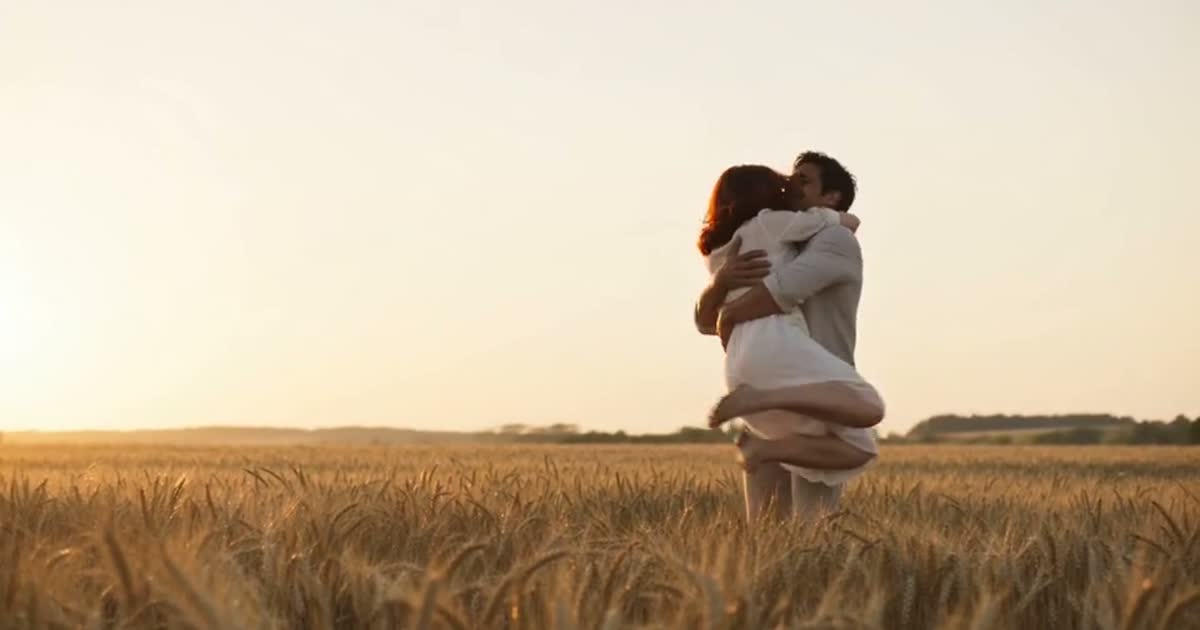
If you want to know how to make a zombie love story video, choose two portraits and decide who survives and who turns. In the couple generator, put the survivor in the first photo slot and the person who turns in the second. The generator makes a 15-second story: one partner cannot fire at the zombie, opens their arms, and the leap becomes a hug in a warm memory.
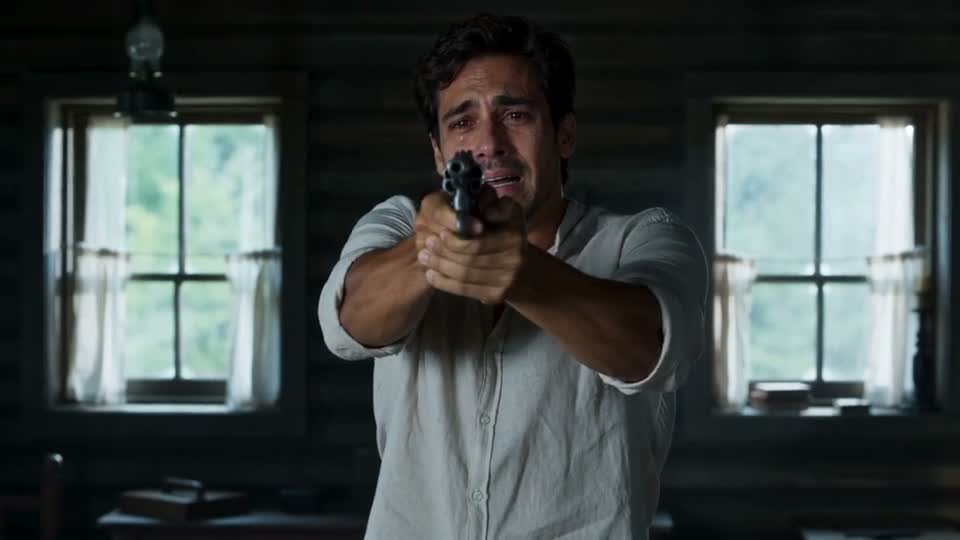
The stills below are from a Zombie Love Story sample we made using two fictional AI characters, one man and one woman. They are not customer photos or customer footage. The film uses the same generation flow as the home page's couple mode.
How to make a zombie love story video step by step
- Agree on the roles. The first photo is the survivor: the person with the gun who chooses the hug. The second is the zombie: the person who approaches in the cabin and appears healthy in the field. Either partner can take either role; the tool does not assign roles by gender.
- Get permission and pick portraits. Ask your partner before using their photo. Use one front-facing, well-lit image per person. Keep hair and the whole face visible so the zombie look and the living memory can still read as the same person.
- Set the video format. Choose 16:9 to match the wide sample, or 9:16 for a full-screen vertical video. Choose 480p or 720p quality. The pricing page lists the current credits required for each resolution.
- Start and review the render. After signing in, confirm the photo permission checkbox and make the video. The completed file appears in My videos. Play the entire zombie story before downloading it, including the sound and the final field scene.
You do not need a special couple photo or a separate “love story” prompt. The two portraits define the cast. The generator supplies the cabin, zombie makeup, movement, and memory scene.
Read the zombie story in the finished video
The first half needs to establish a choice, not just a zombie face. The survivor is visibly distressed and holds the gun; the other person has turned. The survivor lowers the gun and opens their arms. In the second half, the zombie's rush becomes a leap into an embrace, and the same person is alive in the field. That change gives the short video its love-story meaning.
The field is a memory, not a cure scene. When you review your video, check that the person from the second portrait is recognizable both as the zombie and as their living self. The sample below shows the warm ending from the same generated clip.
This difference between the cold cabin and the warm field helps the zombie story make sense even if a viewer watches without a caption. It also makes the sample more useful than a still of zombie makeup alone: you can compare the beginning and the end of your own video.
Pick photos that carry the zombie transformation
A front-facing portrait is especially useful for the person who turns. The zombie close-up changes skin tone and eyes, so recognizable hair, facial shape, and expression matter. A distant group photo gives the model little face detail. A profile can work less reliably when the video cuts to a frontal close-up. Choose a clear original photo and crop around one person if needed.
| Role | Choose a photo with | Why it matters in this zombie story |
|---|---|---|
| Survivor, slot one | Clear face and natural expression | The camera holds on tears and the decision to lower the gun |
| Person who turns, slot two | Visible face and hair, even light | The character appears in both zombie and living scenes |
| Both roles | One subject per image | Keeps each identity tied to the right character |
Clothes and backgrounds in the source photos do not have to match. The video prompt puts the characters in the cabin and then in the field. What you can control directly is the identity and role of each uploaded person, the resolution, and the frame shape.
What to check before sharing the zombie love story
Watch for four beats: the survivor facing the zombie; the gun coming down; the leap; and the healthy reunion in the field. Check the final close-up for facial likeness and the cabin close-up for an acceptable zombie look. Our prompt asks for a non-gory result, but generated images can vary, so review the actual video if you are posting to an audience that may be sensitive to horror imagery.
The video includes sound. Listen once before adding a trending song in an editor; otherwise the generated cabin ambience or soft score may compete with the music. Choose the frame shape for where you plan to post, and preview the exported file on a phone if you chose a vertical format.
If the zombie or survivor resembles the wrong person, first confirm the two portraits went into the intended slots. If a face has little likeness, try a cleaner portrait rather than changing the story. Another render can vary in timing and detail; it does not preserve the exact frames of the first render. A failed generation returns its credits automatically.
When friends ask how to make a zombie love story video, you can show them the two photo roles and the finished sample. For the film itself, use the generator. To compare its shot order with the broader trend, read the AI zombie trend guide. The best result is a zombie video in which both people are recognizable and the final hug clearly belongs to the same pair from the cabin.