
AI Zombie Trend Prompt: How to Write One That Works
A full AI zombie trend prompt you can copy, what each line controls, and the three fixes we made after test renders went wrong, with stills from each one.
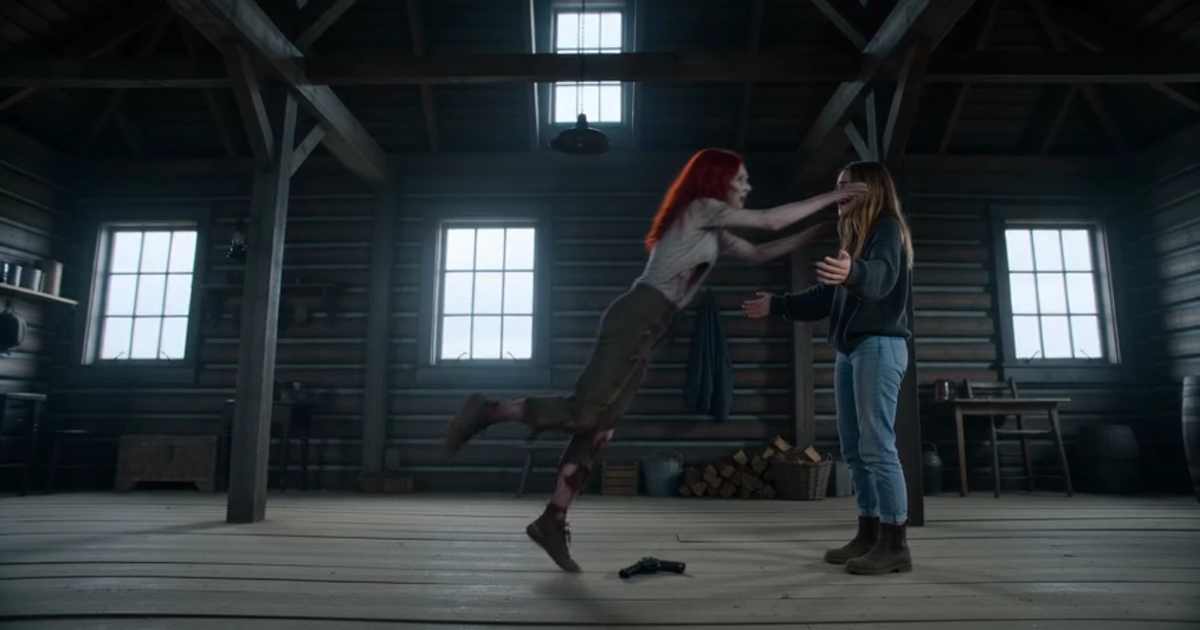
An AI zombie trend prompt has to do three jobs at once: hold a fixed list of shots, keep two faces recognisable, and join a leap in a cabin to a hug in a wheat field. This post gives you the prompt we use on this site, explains what each part of the prompt controls, and shows the three places where our earlier versions failed, with stills from the test renders.
Everything here comes from clips we rendered ourselves on Seedance 2 Fast at 480p and 720p, 15 seconds each, with two reference photos. Where a claim rests on a single render, the text says so.
The AI zombie trend prompt we use
This is the couple version, word for word. @Image1 is the person who holds the gun and @Image2 is the one who turns. Other models name reference images differently, so change those two tags to match yours.
A cinematic widescreen 16:9 short film, exactly 15 seconds, photoreal, 35mm anamorphic look, shallow depth of field, hard cuts only, no text, no subtitles, no logos. Use only the faces, hair and bodies from the reference images and ignore the backgrounds of those images. Two characters: the person from @Image1 and the person from @Image2. Faces stay consistent in every shot. The skin of the person from @Image1 is clean and healthy in every shot: no veins, no wounds, only tears. Part one, inside an old wooden cabin in daytime, dim but readable, soft cool daylight from two windows behind the person from @Image1 with green trees outside. the person from @Image2 has turned into a zombie: pale grey skin, cloudy white eyes, dark veins on the face, messy hair, torn dirty clothes, no blood. Shot 1 (0-1.3s): extreme close-up of the face of the person from @Image1, tears running down their cheeks, aiming a handgun toward the camera, the gun blurred in the foreground, hands trembling. Shot 2 (1.3-2.6s): over their shoulder, the zombie staggers slowly toward them across the cabin. Shot 3 (2.6-3.8s): front medium shot of the person from @Image1 holding the gun with both hands, the two windows behind, sobbing. Shot 4 (3.8-5s): extreme close-up of the face of the zombie, white eyes, bared teeth, snarling. Shot 5 (5-6s): close-up of the person from @Image1 crying, squeezing their eyes shut. Shot 6 (6-8s): front medium shot, they slowly lower the gun, let it fall, and open both arms wide, eyes closed. Shot 7 (8-9.5s): wide side-on profile shot across the cabin. the person from @Image1 stands on the right of the frame with both arms open; the zombie is on the left, sprints at them and leaps off the floor toward their chest. The shot ends with the zombie in mid-air, an instant before contact. Part two, a memory, warm golden sunset light, a wide golden wheat field. the person from @Image2 is alive and healthy with glowing skin, dressed in white; the person from @Image1 wears a white linen shirt. Shot 8 (9.5-12s): a match cut that continues the same leap. The same side-on framing and the same body positions as the end of shot 7, now in the wheat field: the person from @Image2 is in mid-air where the zombie was and lands in the open arms of the person from @Image1, who catches them and spins them around, both laughing, slow motion. Shot 9 (12-15s): close-up, the person from @Image2 smiles with eyes closed as a hand gently holds their cheek, sun flare between them. Sound: wind, shaky breathing and a low growl in the cabin, then a soft emotional piano swell and quiet laughter in the field. No dialogue.
If you would rather skip the prompt, the generator on the home page sends exactly this text with your two photos.
What each part of the prompt controls
A prompt this long is easier to edit once you know which sentence does which job.
| Part of the prompt | What it controls | What happens without it |
|---|---|---|
| "exactly 15 seconds", shot timings | Length and pacing | Shots run long and the memory scene gets cut short |
| "hard cuts only, no text, no subtitles" | Editing style | The model adds fades, captions or a title card |
| "Faces stay consistent in every shot" | Likeness | A face drifts between the close-up and the wide shot |
| "The skin of the person from @Image1 is clean" | Keeps the survivor human | Zombie veins appear on the wrong face |
| Numbered shots with camera angles | Shot order | Shots merge or arrive in a different order |
| "a match cut that continues the same leap" | The cabin-to-field join | A plain cut with no link between the two scenes |
| The "Sound:" line | Audio | Random music, or dialogue |
The numbered shot list held in every text render we made. Across five renders the shots came back in the order written each time. The detail inside a shot was less reliable, and that is where the fixes below come from.
Fix 1: keep the zombie look off the survivor
Our first prompt described the zombie's skin and said nothing about the other person's. The model spread the look across both faces.
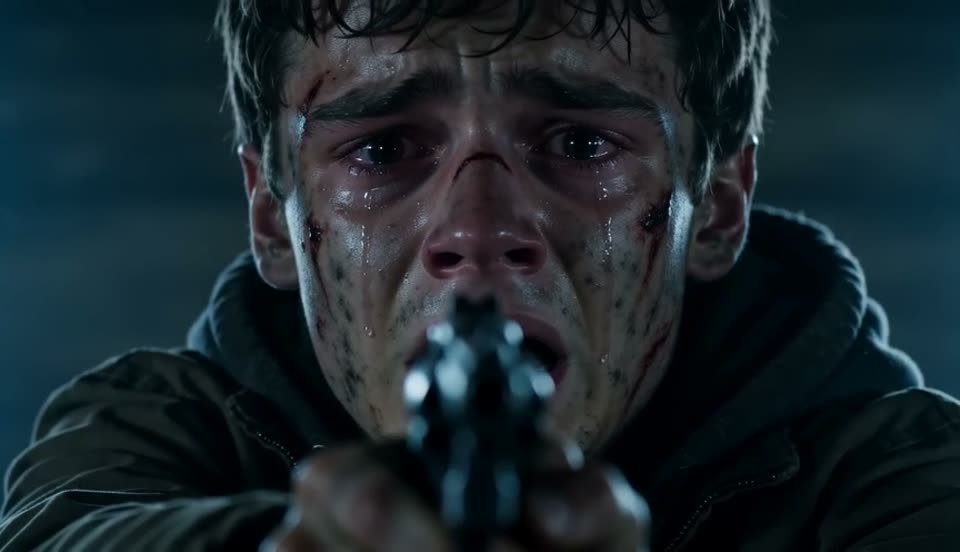
The fix was one sentence that describes the survivor directly: clean, healthy skin, "no veins, no wounds, only tears". Describing what a character should look like worked better than a general instruction to keep the two apart. In every render after that change the survivor's face stayed clean.
Fix 2: say where both people stand during the leap
The second version of the prompt asked for the zombie to sprint "straight at the camera" right after a front-facing shot of the survivor. The model combined the two and placed the zombie in front of the survivor, in the same frame, facing the wrong way.
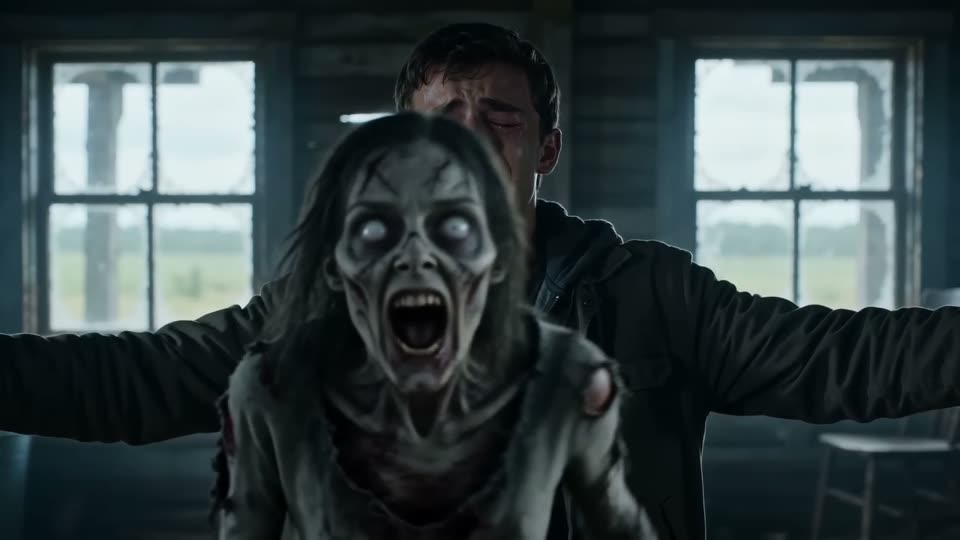
It did this in both clips rendered with that wording, one with a person and one with a dog. The cause was the prompt, because it never said where either character stood.
The version that works gives the shot a camera position and a place for each character: a wide side-on shot, the survivor on the right with open arms, the zombie on the left. It also says where the shot ends: with the zombie in mid-air, an instant before contact.
Fix 3: write the match cut into the prompt
In the trend, the zombie's leap does not end in the cabin. It lands as a hug in the field, and that join is what people remember. A prompt that only says "cut to a memory" gives you two unrelated scenes.
The line that produced the join describes the next shot in terms of the last one: the same side-on framing, the same body positions, and the living person "in mid-air where the zombie was".
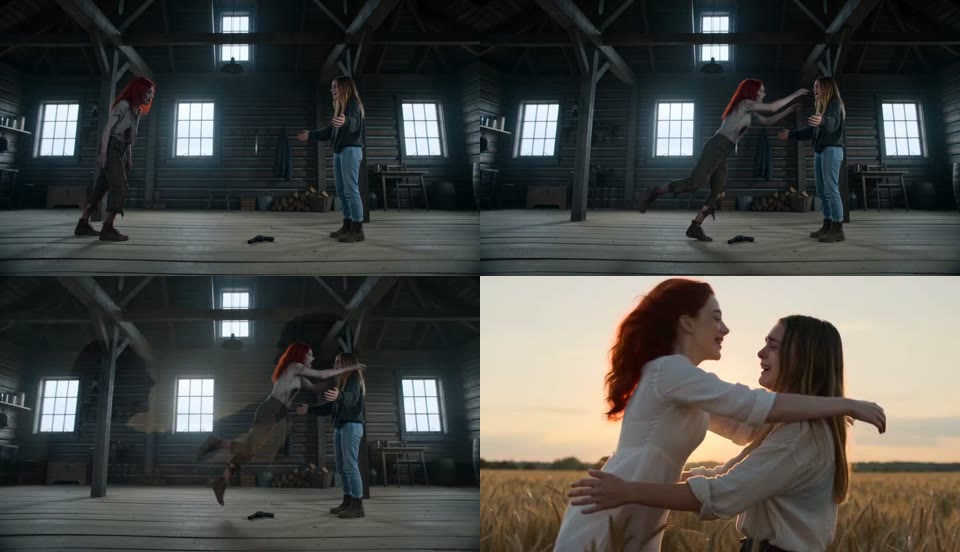
We rendered this wording twice, once for a couple and once for a pet, and the leap carried into the field both times. Two renders is a small sample, so expect to retry now and then.
Why we stopped using a reference video
Before writing the prompt above, we tried the other common route: give the model a finished clip as a reference video and a short prompt that says "replace both people with the ones in my photos". We ran it twice with the same clip and the same two photos.
| Run 1 | Run 2 | |
|---|---|---|
| Shot order and camera moves | Same as the reference clip | Same as the reference clip |
| Person holding the gun | Replaced in every shot | Replaced only in the front cabin shots |
| Person in the memory scene | Replaced | Not replaced |
| Zombie in the cabin | Not replaced | Not replaced |
A reference video fixed the shots and failed on the people. A text prompt with two reference photos did the opposite: it needed more care with the shots, and it put the right faces on both characters, including the zombie.
How to keep the zombie looking like the person
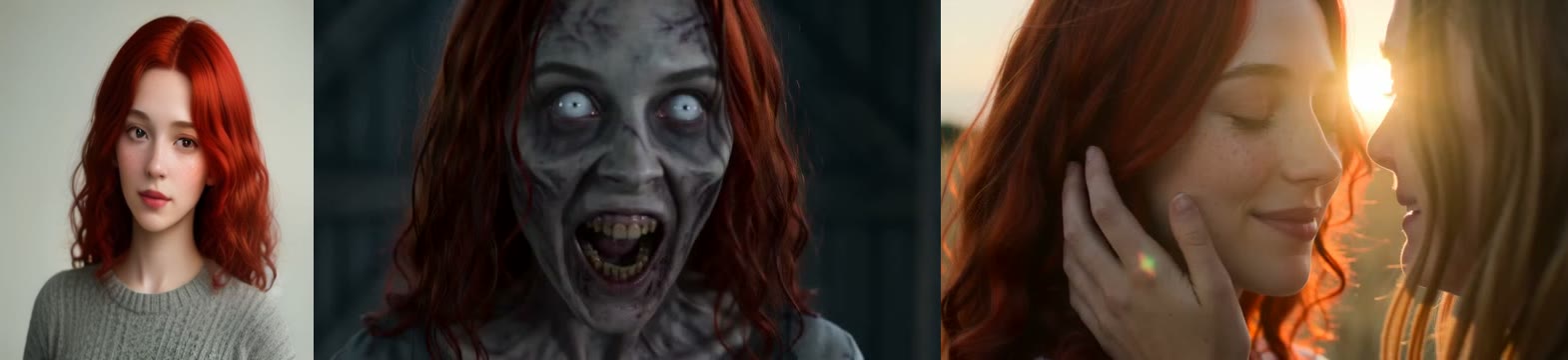
Three things in the prompt carried likeness through the zombie makeup:
- The prompt lists what changes (skin, eyes, veins, clothes) and leaves hair alone. In the render above the zombie kept the red hair from the photo.
- The same character is named in both halves, as "the person from @Image2", so the model treats the zombie and the living person as one.
- "Faces stay consistent in every shot" appears once, near the top.
The photo matters as much as the prompt. Use a front-facing picture with the whole head in frame and even light, with one person in it.
What the prompt cannot promise
The prompt asks for no blood. Most renders followed that, though the pet clip showed dark stains around the mouth. If that matters for where you post, check the close-up before you publish.
No AI zombie trend prompt returns the same clip twice. The shots stay in order, and the faces, the timing of the leap and the amount of grime change a little each time.
To see the result of this prompt as finished clips, watch the couple and pet examples. The pet version uses the same prompt with the second character written as a dog or a cat, and the AI zombie trend page has the shot list of the trend itself.